
Advanced Surface
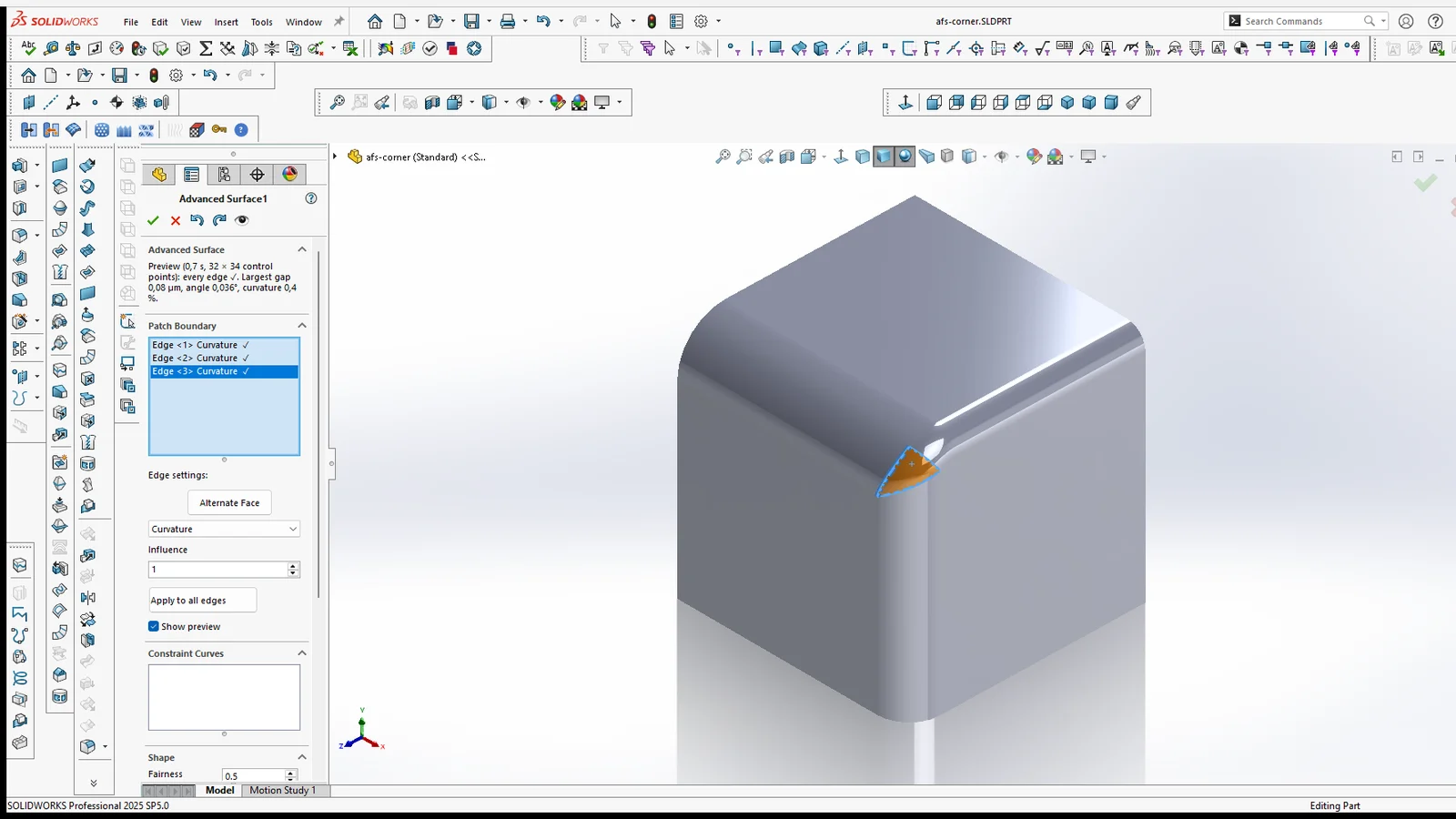
Fills a hole, a corner, a ring or the gap between separate surfaces with one smooth NURBS surface: in contact, tangent (G1) or curvature-continuous (G2) to every edge you pick. Free edges you control, constraint curves and points you can shape inside, and every edge measured after the build.
Where to find it
Advanced Surface Tools tab › Advanced Surface (Surfaces section). Select the edges or sketch curves around the hole before or after clicking it. The result is an Advanced Surface feature in the tree that adds one surface body; knit it to the faces around it, thicken it or use it to replace a face, as with any surface.
What you can fill
Edge settings
Each picked edge is a line in the Surface Boundary list, with its settings and, after the preview, a ✓ or ✗ for whether it met its targets. Click a line to set that edge; Ctrl + click or Shift + click highlights several lines and a change applies to all of them. With no line highlighted a change applies to every edge; Apply to all edges copies the highlighted line’s settings to the others.
Free edges and separate surfaces
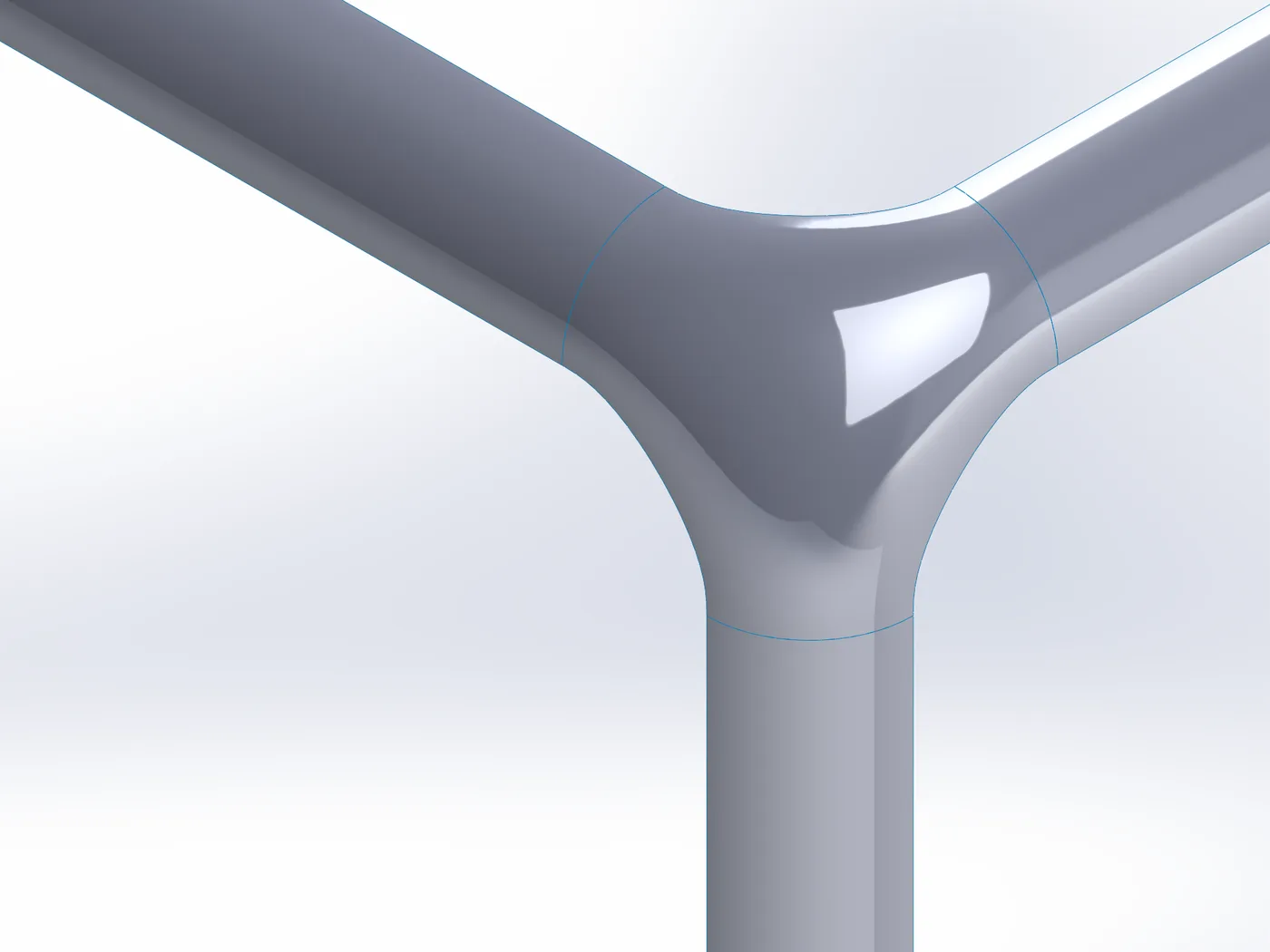
Where the picked edges do not form a closed loop, the gaps between them become free edges. Each one leaves its surface along that surface’s own direction (or along the face’s side edge, where there is one) and arrives tangent at the next one, so the outline runs on smoothly instead of cutting straight across.
Free edge tension sets how far a free edge runs along the neighbouring surface before it curves across; each edge’s Influence scales it at that end. Where the outline has arms, such as fillet strips meeting at a junction, Split into patches builds each arm as its own four-sided surface and the middle one held to them, sewn into one body.
Shape
Constraint curves and points
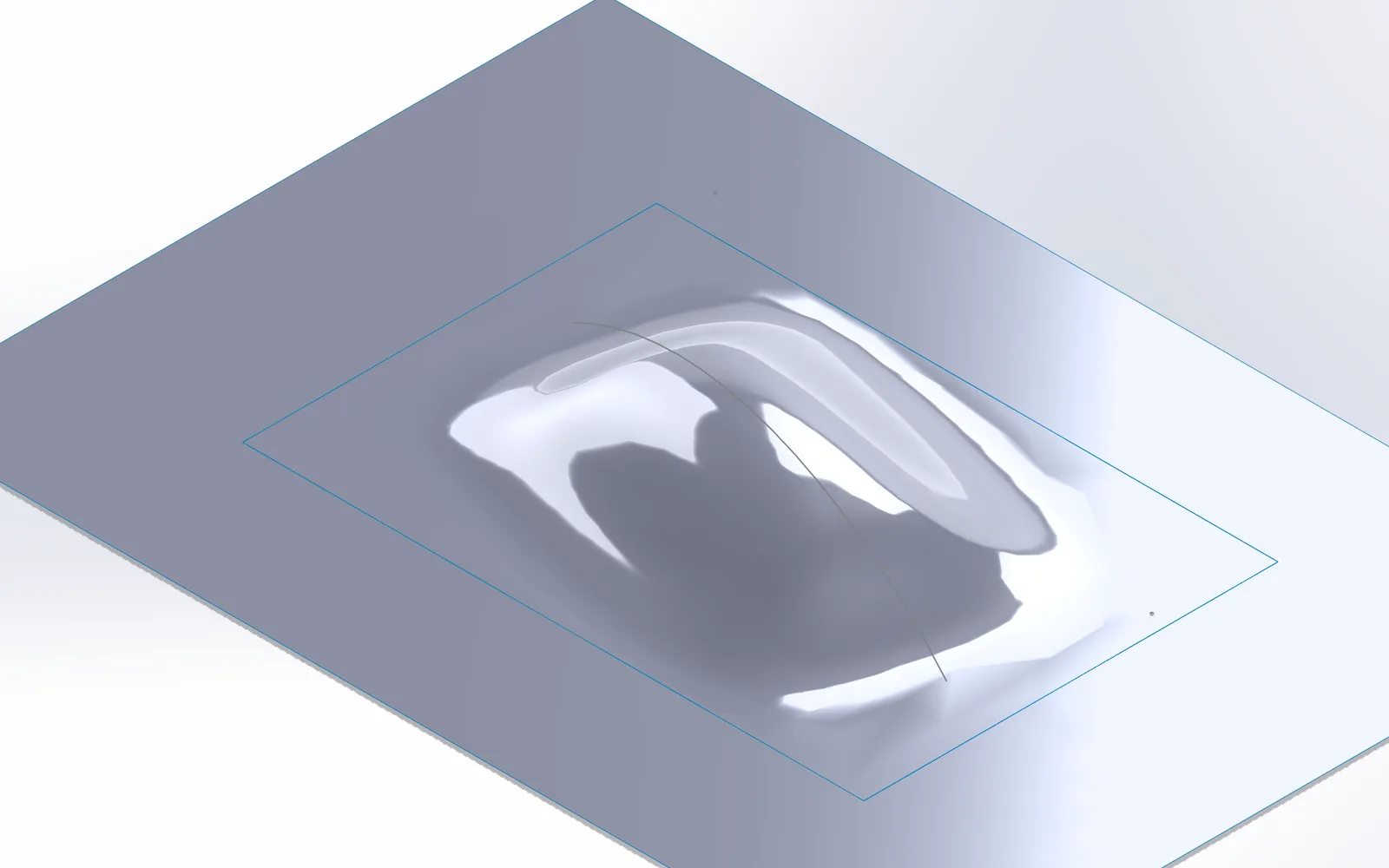
Curves and points inside the boundary that the surface passes through: a ridge, a crown height, a character line. Pick them in the Constraint Curves box: 2D or 3D sketch segments, sketch points, whole sketches, model edges and vertices. Editing the sketch or the edge updates the surface. A curve that ends on a tangent edge has to leave it in that face’s tangent plane, or both cannot hold; the page says which curve and edge.
Click a constraint’s line to shape it (Ctrl + click for several); the line shows its settings, e.g. *Curve <1> · 50 % · Sharp 30 %*:
Hard creases
A constraint curve with Profile Crease becomes a real sharp edge: the curve splits the fill, each side is its own surface meeting the curve at its own angle, and both are sewn into one body along it. Every boundary edge keeps its Contact, Tangent or Curvature condition. Strength, Height, Taper and Reach do not apply to a crease.
A crease runs from the boundary to the boundary, or ends on an earlier crease (a T). Creases must not cross each other. A curve that stops short of the boundary is refused, with the distance of each end.
In a ring (a hole with an island), the first crease runs from the outer edge to the island and cuts the ring open; more creases split it further. With a single crease, both loops have to be free of corners (round or smooth outlines); with two or more, any outline works.
A crease that leaves a tangent edge at an angle bends the surface next to that corner (the page reports the zone), just like any constraint curve that meets a tangent edge.
Measured, not assumed
After every preview and every rebuild, each edge is measured on the finished surface: the largest gap, the angle to the face and the curvature difference across it, against the Quality targets (defaults 1 µm, 0.05°, 2 %). The page shows the worst values and which edge missed by how much; the feature keeps the same report.
Where fillets of different radii meet, no surface can match all their curvatures right at the corner: Advanced Surface blends the curvature over a short zone next to it and reports that zone, instead of leaving a kink.
Compared with SOLIDWORKS’ Filled Surface
Both tools on the same edges in SOLIDWORKS 2025, measured the same way: every point along the edges against the result, points next to a sharp corner left out for both. G2 cases with Curvature, G1 cases with Tangent on every edge.
| Case | Advanced Surface: gap · angle · curvature | Filled Surface: gap · angle · curvature | Off the original surface (ours / SW) |
|---|---|---|---|
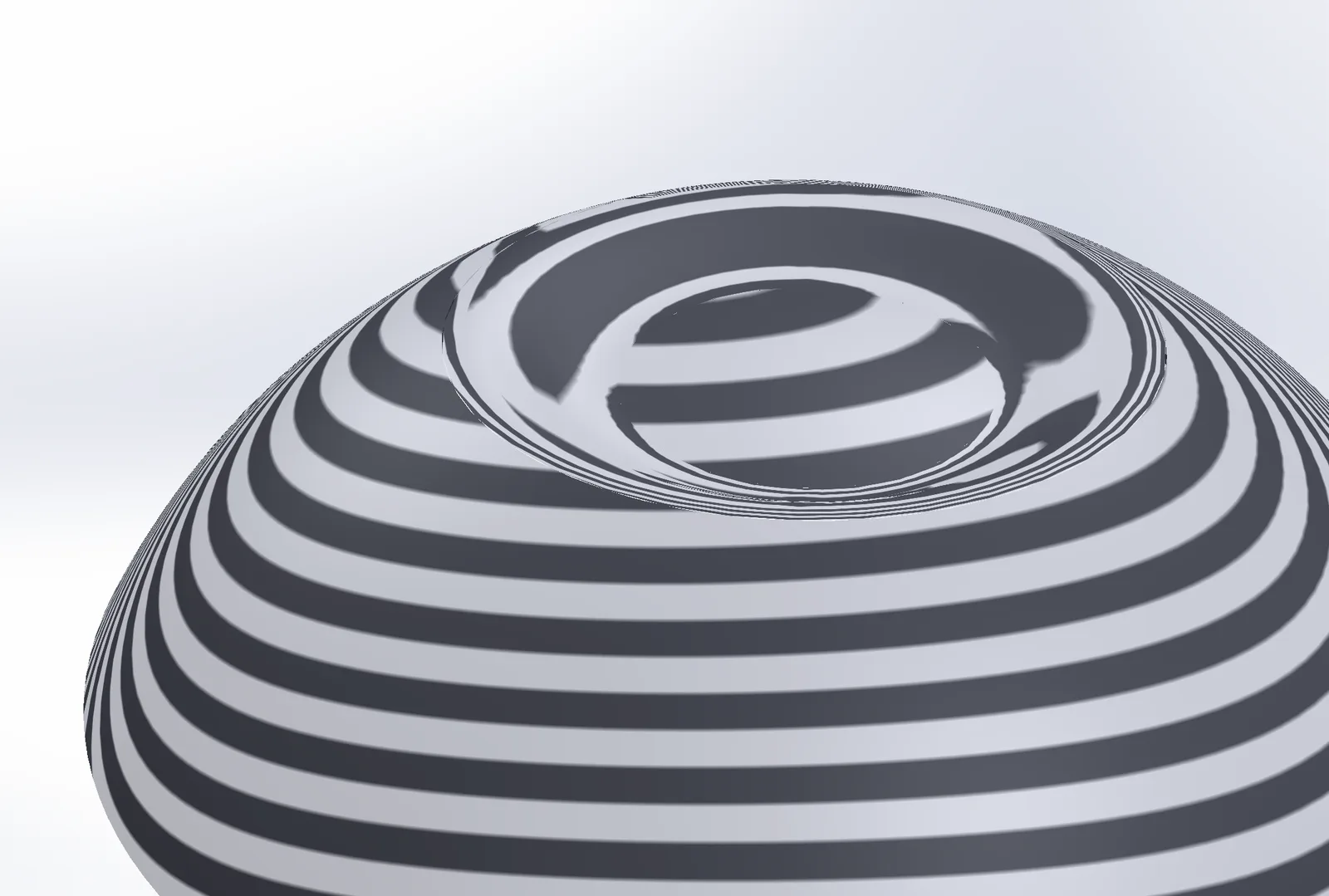
| Round hole in a sphere | 0.10 µm · 0.004° · 0.06 % | 0.61 µm · 0.020° · 1.65 % | 1.3 µm / 318 µm |
| Square hole in a curved sheet | 0 µm · 0.0001° · 0 % | 0.08 µm · 0.005° · 0.08 % | 0 µm / 0.2 µm |
| Three-sided hole (octant of a sphere) | 0.41 µm · 0.027° · 0.14 % | 1.69 µm · 0.040° · 1.33 % | 4.1 µm / 229 µm |
| Pentagon in a dome | 0.10 µm · 0.005° · 0 % | 0.20 µm · 0.007° · 0 % | 0.8 µm / 3.3 µm |
| Large patch across a bottle shoulder | 0.37 µm · 0.049° · 0.13 % | 0.21 µm · 0.028° · 0.49 % | 1.0 µm / 20.7 µm |
| Corner of fillets 5 / 8 / 12 mm, corner face removed | 0.08 µm · 0.036° · 0.02 % | 0.09 µm · 0.047° · 0.03 % | – |
| The same corner face replaced on the solid | 0.08 µm · 0.036° · 0.02 % | 0.44 µm · 0.020° · 81 % | – |
| The same, Tangent (G1) | 0.06 µm · 0.015° | 0.05 µm · 0.69° | – |
| Corner of three equal fillets, Tangent (G1) | 0.08 µm · 0.023° | 0.30 µm · 0.25° | – |
| Corner between three separate fillet surfaces | 0.12 µm · 0.029° · 0 % | no feature | – |
| Cross of four tilted strips, free edges between the arms | 0.60 µm · 0.066° · 0 % (2.7 % next to the corners) | no feature | – |
Curvature: the difference across the edge, away from corners. Off the original surface: for holes cut from a known surface, the largest distance of the fill from it (Shape inside = Auto). Build time per feature: Filled Surface 0.1–0.5 s, Advanced Surface 0.2–0.9 s.
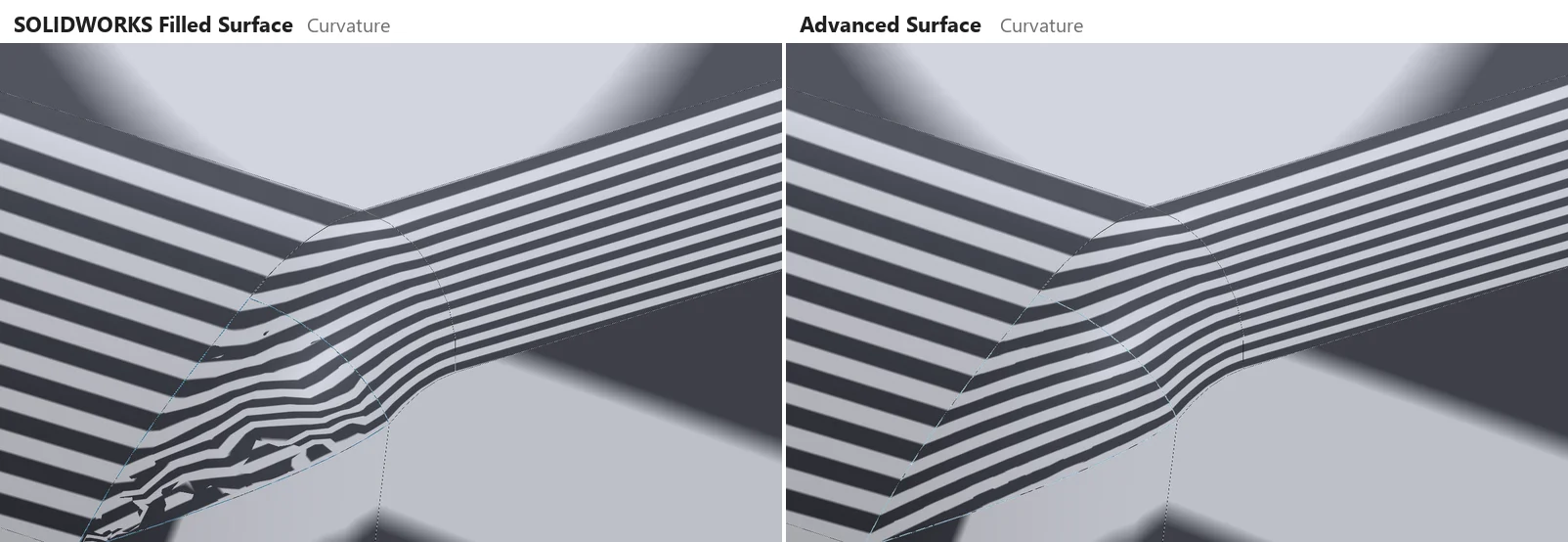
- Where Advanced Surface is better: the angle at the edges is tighter in 7 of 9 compared cases (up to 47 × on tangent corners), the curvature difference smaller in 6 of 7 G2 cases; curvature-continuous corners between fillets; boundaries Filled Surface refuses (separate surfaces, free edges, bridges); a fill that stays close to the surface a hole was cut from; a measured report per edge.
- Where SOLIDWORKS is better: speed (Filled Surface builds in 0.1–0.5 s); on the bottle shoulder a tighter gap and angle, and on the replaced corner face a smaller angle (though with 81 % curvature mismatch); and it needs no add-in to rebuild.
- Not compared: Boundary Surface and Loft with curvature conditions also make smooth four-sided patches from curves in two directions; for such patches they may be just as good.
Editing the feature
Right-click the feature › Edit Feature: the page opens with its edges and settings, rolled back to just before the feature, and shows the preview. Picking other edges replaces the feature in its place in the tree, under its name. OK or Cancel puts the rollback bar back where you had it.
The sketches it uses (boundary and constraints) sit under the feature in the tree, as with SOLIDWORKS’ own features. The surface follows when they or the edges change; a sketch it no longer uses goes back to the top of the tree.
Good to know
- One boundary per feature: one closed loop, two closed loops (a ring: one hole), or open runs joined by free edges (up to 8 runs, up to 32 segments). Two or more holes are not possible yet.
- The result is a surface body: knit, thicken or replace a face with it yourself.
- Ends of curves closer than 0.5 mm count as a gap you meant to close: refused with the distance. Advanced Surface never bridges a gap silently.
- A boundary whose curvature jumps where two edges meet tangentially (a straight edge running into a fillet) is met on four-sided boundaries; on trimmed ones a small miss can remain at that point, and the report shows it.
- The surfaces are degree 5 with 12 to 40 control points per direction (64 with shaped constraints). A very narrow Reach on a large boundary costs time: about a second for a spike 5 mm wide on a 50 mm hole.
- Like every Advanced Surface Tools feature, it is rebuilt by the add-in: the part opens without it, but the feature cannot be rebuilt or edited there. The add-in is a free download and needs no licence to rebuild; send STEP or Parasolid to anyone who will not install it.